



使用docker构建基于Prometheus的MySQL监控
前言:最近在研究prometheus,瞬间感觉有一站式解决监控的组件还是很方便的,遂尝试自己部署监控mysql的一套小demo
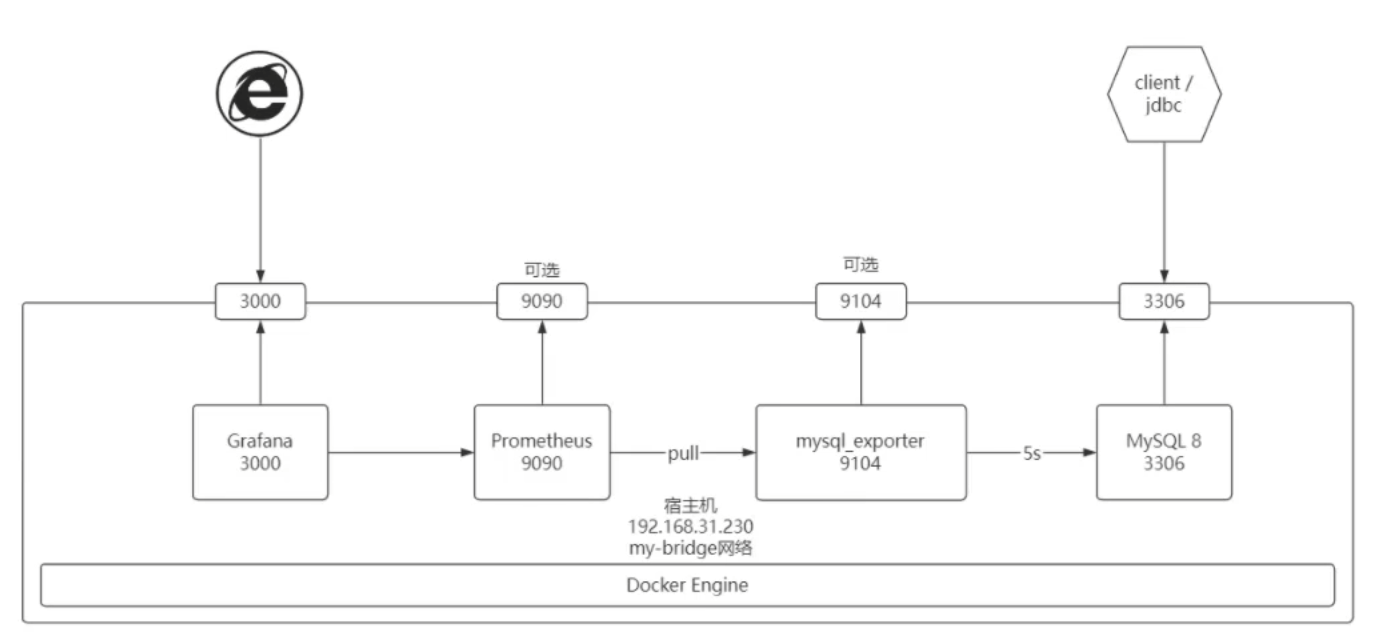
1.构建mysql初始化
在这里我害怕把原有的库给搞坏,遂使用新库进行尝试。
构建sql语句
mkdir -p /etc/mysql/init.d
cat > /etc/mysql/init.d/schema.sql <<-'EOF'
SET NAMES utf8mb4;
SET @OLD_UNIQUE_CHECKS=@@UNIQUE_CHECKS, UNIQUE_CHECKS=0;
SET @OLD_FOREIGN_KEY_CHECKS=@@FOREIGN_KEY_CHECKS, FOREIGN_KEY_CHECKS=0;
SET @OLD_SQL_MODE=@@SQL_MODE, SQL_MODE='TRADITIONAL';
DROP SCHEMA IF EXISTS sakila;
CREATE SCHEMA sakila;
USE sakila;
--
-- Table structure for table `actor`
--
CREATE TABLE actor(
actor_id SMALLINT UNSIGNED NOT NULL AUTO_INCREMENT,
first_name VARCHAR(45) NOT NULL,
last_name VARCHAR(45) NOT NULL,
last_update TIMESTAMP NOT NULL DEFAULT CURRENT_TIMESTAMP ON UPDATE CURRENT_TIMESTAMP,
PRIMARY KEY (actor_id),
KEY idx_actor_last_name (last_name)
) ENGINE=InnODB DEFAULT CHARSET=utf8mb4;
CREATE USER remote@'%' IDENTIFIED with mysql_native_password BY 'remote';
grant all privileges on *.* to remote@'%';
-- create exporter user
-- create user'exporter'@'%'identified by 'exporter';
-- GRANT PROCESS, REPLICATION CLIENT, SELECT ON *.* TO 'exporter'@'%';
-- flush privileges;
CREATE USER 'exporter'@'%'IDENTIFIED BY 'exporter';
GRANT PROCESS, REPLICATION CLIENT ON *.* TO 'exporter'@'%';
GRANT SELECT ON performance_schema.* TO 'exporter'@'%';
EOF启动mysql容器
docker run -d -p 3309:3306 --network 0921bridge --name db -v /etc/mysql/init.d:/docker-entrypoint-initdb.d -e MYSQL_ROOT_PASSWORD=root mysql:8.0.302.构建mysqld_exporter
启动mysqlexporter
docker run -d -p 9104:9104 --network 0921bridge --name mysql_exporter -e DATA_SOURCE_NAME="exporter:exporter@(db:3306)/sakila" prom/mysqld-exportermysql-exporter报错:
[root@localhost init.d]# docker logs mysql_exporter
ts=2024-09-21T09:56:35.490Z caller=mysqld_exporter.go:220 level=info msg="Starting mysqld_exporter" version="(version=0.15.1, branch=HEAD, revision=cc349684494b5038ec5a52233bdca9eb9291e6f2)"
ts=2024-09-21T09:56:35.490Z caller=mysqld_exporter.go:221 level=info msg="Build context" build_context="(go=go1.21.5, platform=linux/amd64, user=root@d89c15b9f5ad, date=20231212-07:55:09, tags=unknown)"
ts=2024-09-21T09:56:35.491Z caller=config.go:150 level=error msg="failed to validate config" section=client err="no user specified in section or parent"
ts=2024-09-21T09:56:35.491Z caller=mysqld_exporter.go:225 level=info msg="Error parsing host config" file=.my.cnf err="no configuration found"
解决思路:
使用docker exec -it db bin/bash 进容器进行查看,使用 mysql -u exporter -p 尝试账户密码是否错误,没问题,后续查看配置文件是否有问题,没问题。
最后使用docker compose方法见文末 参考 : https://discuss.prometheus.io/t/docker-compose-mysql-exporter-start-error/1734
3.构建prometheus.yml文件
mkdir /etc/prometheus
cat > /etc/prometheus/prometheus.yml <<-'EOF'
# my global config
global:
scrape_interval: 15s # Set the scrape interval to every 15 seconds. Default is every 1 minute.
evaluation_interval: 15s # Evaluate rules every 15 seconds. The default is every 1 minute.
#scrape_timeout is set to the global default(10s).
# Alertmanager configuration
alerting:
alertmanagers:
- static configs:
- targets:
#-alertmanager:9093
# Load rules once and periodically evaluate them according to the global 'evaluation interval'.
rule files:
# - "first rules.yml'
# - "second rules.yml"
# A scrape configuration containing exactly one endpoint to scrape:
# Here it's Prometheus itself.
scrape configs:
# The job name is added as a label `job=<job name>`to any timeseries scraped from this config.
- job name:"prometheus"
# metrics_path defaults to'/metrics
# scheme defaults to 'http'
static_configs:
- targets:["localhost:9090"]
### 以下内容为SpringBoot应用配置
- job_name:"mysql_metrics"
scrape interval:5s
metrics_path:'/metrics'
static_configs:
- targets:['mysql_exporter:9104']
EOFdocker 启动 promethus
docker run -p 9090:9090 --name=prometheus -v /etc/prometheus/prometheus.yml:/etc/prometheus/prometheus.yml --network 0921bridge bitnami/prometheus:latest遇见问题:
报错,使用docker logs 发现是配置文件问题。
解决办法:修改promethues.yaml
global:
scrape_interval: 15s # Set the scrape interval to every 15 seconds. Default is every 1 minute.
evaluation_interval: 15s # Evaluate rules every 15 seconds. The default is every 1 minute.
#alerting:
# alertmanagers:
# - static configs:
# - targets:
#rule files:
scrape_configs:
- job_name: 'prometheus'
static_configs:
- targets: ['localhost:9090']
- job_name: 'mysql_exporter'
static_configs:
- targets: ['mysql_exporter:9104']
4.构建grafna监控仪表盘
docker run -p 3000:3000 --name=grafana --network 0921bridge grafana/grafana初始帐密都是admin
5.成功案例
解决方案:使用docker compose 解决问题,问题在于exporter DATA_SOURCE_NAME="exporter:exporter@(db:3306)/sakila" 不生效。
使用docker compose 部署
docker-compse.yml
version: '1'
services:
    prometheus:
        image: bitnami/prometheus:latest
        volumes:
            - /etc/prometheus/prometheus.yml:/etc/prometheus/prometheus.yml
        ports:
            - "9090:9090"
        networks:
            - "0921bridge"
        depends_on:
            - mysqld_exporter
        links:
            - mysqld_exporter:mysqld_exporter
    grafana:
        image: grafana/grafana:latest
        volumes:
            - /etc/localtimegrafana:/etc/localtime:ro
        ports:
            - "3000:3000"
        networks:
            - "0921bridge"
        depends_on:
            - prometheus
        links:
            - prometheus:prometheus
    mysqld_exporter:
        image: prom/mysqld-exporter
        container_name: mysql_exporter
        restart: unless-stopped
        command:
         - "--mysqld.username=exporter:exporter"
         - "--mysqld.address=db:3306"
        networks:
            - "0921bridge"
    mysql:
        image: mysql:8.0.30
        container_name: db
        ports:
          - "3309:3306"
        volumes:
          - /etc/mysql/init.d:/docker-entrypoint-initdb.d
        environment:
          MYSQL_ROOT_PASSWORD: root
        networks:
          - "0921bridge"
networks:
    0921bridge:
如果要单独访问这些端口的话需要放开防火墙
firewall-cmd --zone=public --add-port=3309/tcp --permanent
firewall-cmd --zone=public --add-port=9104/tcp --permanent
firewall-cmd --zone=public --add-port=3000/tcp --permanent
firewall-cmd --zone=public --add-port=9090/tcp -permanent
firewall-cmd --reload
配置grafana
在 Home/Connections/Data sources中配置connection url http://prometheus:9090
在 Home /Dashboards 中选择模板进行展示mysql模板 7362
6.docker-compose命令
# 启动容器(如果不存在容器就创建、存在则修改)
docker compose -f docker-compose.yml up -d
# 删除所有容器
docker compose -f docker-compose.yml down
# 停止所有容器
docker compose -f docker-compose.yml stop
# 启动所有容器
docker compose -f docker-compose.yml start
# 重启所有容器
docker compose -f docker-compose.yml restart尝试监控现有数据库
首先将容器db从network:0921bridge中断开
docker network disconnect 0921bridge db将现在使用的mysql加入网络
docker network connect 0921bridge mysqldocker run -d -p 9104:9104 --network 0921bridge --name mysql_exporter -e DATA_SOURCE_NAME="root:1234@(db:3306)/db_spzx" prom/mysqld-exporter报错:
ts=2024-09-21T11:37:16.641Z caller=mysqld_exporter.go:220 level=info msg="Starting mysqld_exporter" version="(version=0.15.1, branch=HEAD, revision=cc349684494b5038ec5a52233bdca9eb9291e6f2)"
ts=2024-09-21T11:37:16.641Z caller=mysqld_exporter.go:221 level=info msg="Build context" build_context="(go=go1.21.5, platform=linux/amd64, user=root@d89c15b9f5ad, date=20231212-07:55:09, tags=unknown)"
ts=2024-09-21T11:37:16.641Z caller=config.go:150 level=error msg="failed to validate config" section=client err="no user specified in section or parent"
ts=2024-09-21T11:37:16.642Z caller=mysqld_exporter.go:225 level=info msg="Error parsing host config" file=.my.cnf err="no configuration found"
尝试将.my.cnf挂载到根目录
docker run -d -p 9104:9104 --network 0921bridge -v /media/.my.cnf:/.my.cnf -v /media.my.cnf:/my.cnf --name mysql_exporter -e DATA_SOURCE_NAME="root:1234@(db:3306)/db_spzx" bitnami/mysqld-exporter无效
尝试拉取其他镜像
docker pull bitnami/mysqld-exporter:latestdocker run -d -p 9104:9104 --network 0921bridge --name mysql_exporter -e DATA_SOURCE_NAME="root:1234@(db:3306)/db_spzx" bitnami/mysqld-exporter无效
参考链接
https://github.com/prometheus/mysqld_exporter/issues/672
https://github.com/prometheus/mysqld_exporter/issues/750
docker run -p 9104:9104 -v $(pwd)/.my.cnf:/cfg/.my.cnf --network 0921bridge bitnami/mysqld-exporter --config.my-cnf=/cfg/.my.cnfdocker run -d --name db --network 0921bridge -p 3309:3306 -v /media/mysql_data:/var/lib/mysql -v /media/mysql_conf:/etc/mysql --restart=always -e MYSQL_ROOT_PASSWORD=1234 mysql:8.0.30重新执行成功案例
解决方案:使用docker compose 解决问题,问题在于exporter DATA_SOURCE_NAME="exporter:exporter@(db:3306)/sakila" 不生效。
使用docker compose 部署
docker-compse-mg.yml
version: '1'
services:
    prometheus:
        image: bitnami/prometheus:latest
        volumes:
            - /etc/prometheus/prometheus.yml:/etc/prometheus/prometheus.yml
        ports:
            - "9090:9090"
        networks:
            - "0921bridge"
        depends_on:
            - mysqld_exporter
        links:
            - mysqld_exporter:mysqld_exporter
    grafana:
        image: grafana/grafana:latest
        volumes:
            - /etc/localtimegrafana:/etc/localtime:ro
        ports:
            - "3000:3000"
        networks:
            - "0921bridge"
        depends_on:
            - prometheus
        links:
            - prometheus:prometheus
    mysqld_exporter:
        image: prom/mysqld-exporter
        container_name: mysql_exporter
        restart: unless-stopped
        command:
         - "--mysqld.username=exporter:exporter"
         - "--mysqld.address=db:3306"
        networks:
            - "0921bridge"
    mysql:
        image: mysql:8.0.30
        container_name: db
        ports:
          - "3309:3306"
        volumes:
          - /etc/mysql/init.d:/docker-entrypoint-initdb.d
        environment:
          MYSQL_ROOT_PASSWORD: root
        networks:
          - "0921bridge"
networks:
    0921bridge:
评论区